By default, all email notifications are sent from Quickly Booked App’s notifications@quicklybooked.app email address. However, to align with your brand identity, you have the option to customize the sender email address that your customers will see when receiving emails from Quickly Booked App.
The Online Payments feature for Quickly Booked Appis considered a premium feature, and it will be counted towards your total number of Custom Features & Integrations.
To customize the sender’s email address, follow these steps:
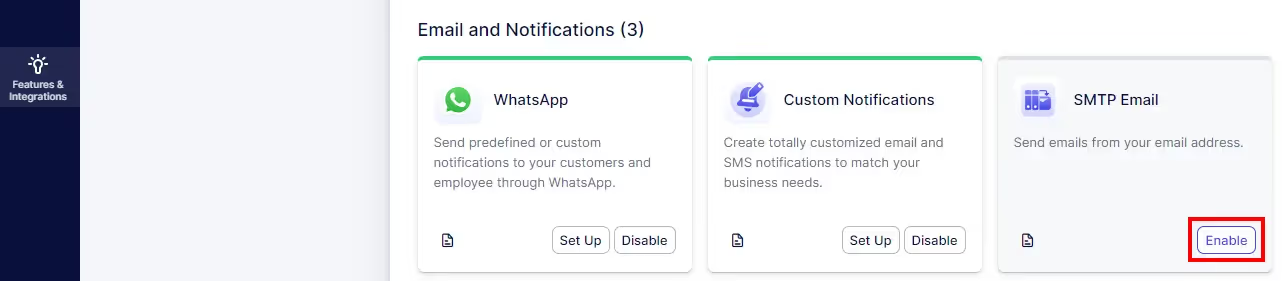
After clicking on “Set up” for the SMTP Email feature, you will be presented with fields to fill in your SMTP server details:
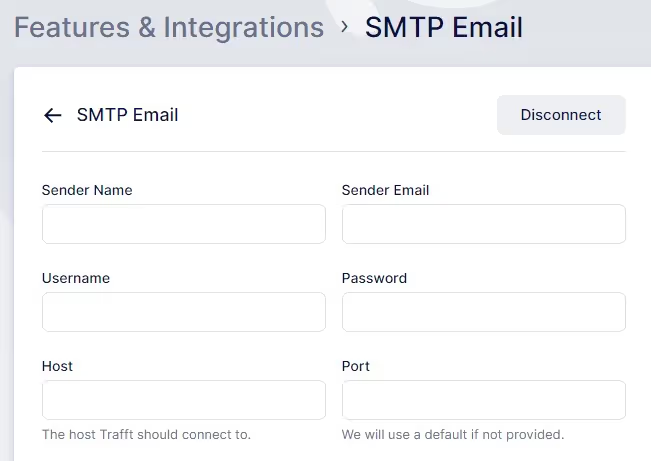
Here are the fields you’ll need to fill in for the SMTP Email feature:
Quickly Booked App will then use these settings to send email notifications, displaying the specified sender name and email address to your customers.
After configuring these SMTP settings, it’s important to note that this will be the default email address from which all emails will be sent. Currently, Quickly Booked App does not support configuring separate SMTP settings per employee. All email notifications, including appointment confirmations, reminders, and updates, will be sent using the specified sender name and email address.
When using SMTP with Gmail, it’s necessary to set up an App Password for Quickly Booked App . App Passwords are required for accounts with 2-Step Verification enabled. You can find detailed instructions on how to set up an App Password for Quickly Booked App on Google’s Documentation, here.
For Microsoft accounts, including Microsoft 365 users, it’s also essential to create an App Password for Quickly Booked App . App Passwords are used with accounts that have 2-Step Verification enabled in the Security Basics section of your Microsoft account. Instructions for creating an App Password for Quickly Booked App can be found in Microsoft’s Documentation, here
For Microsoft 365 users, particularly those with business accounts, creating an App Password is mandatory. However, for tenants created on or after October 22, 2019, Security Defaults are typically enabled by default. With Security Defaults enabled, older mail protocols like IMAP, SMTP, or POP3 may be blocked for authentication. To resolve this, you may need to disable Security Defaults. Detailed instructions on how to disable Security Defaults can be found here.
Please Note:
App Passwords provided by email providers often appear in this format: “nbkp iezm megp jlgb“.
When copying the password, the “copy” button should remove the spaces automatically. However, we recommend pasting the password into Notepad (or a similar application) first. If the password is pasted with spaces included, you’ll need to manually remove the spaces before copying and pasting it into Quickly Booked App. Here’s an example:
If the app password is pasted with spaces included, you will encounter connection issues when trying to connect to the host
Got questions? We’ve put together clear answers to help you get started with confidence.

All plans include unlimited staff members, services, and locations. There are no per-user or per-location fees and no upgrade required as you grow. Everything is included from day one.

Yes. You can collect deposits, full payments, or partial payments for any service. You decide the amount clients pay upfront, and the rest can be charged later or at the appointment.



