Connect your booking system with external tools and platforms for a smoother, automated workflow.
If you manage multiple Pixels through Google Tag Manager (GTM) and advertise across various platforms, connecting your Quickly Booked App Booking Page with GTM allows you to track crucial metrics and traffic sources. This integration enables you to gather data for remarketing efforts and more streamlined analytics.
The Google Tag Manager integration for Quickly Booked App is free and will not be counted towards your total number of Custom Features & Integrations.
To enable this integration, navigate to the Features & Integrations section within Quickly Booked App. Locate the “Google Tag Manager” integration, and activate it with a simple click on the “Enable” button.

Once enabled, the card will refresh to display a “Set Up” button. Clicking this button will open a new page with instructions on how to find your Google Tag Manager Container ID. Once you locate it, simply paste it into the designated field as shown in the image below
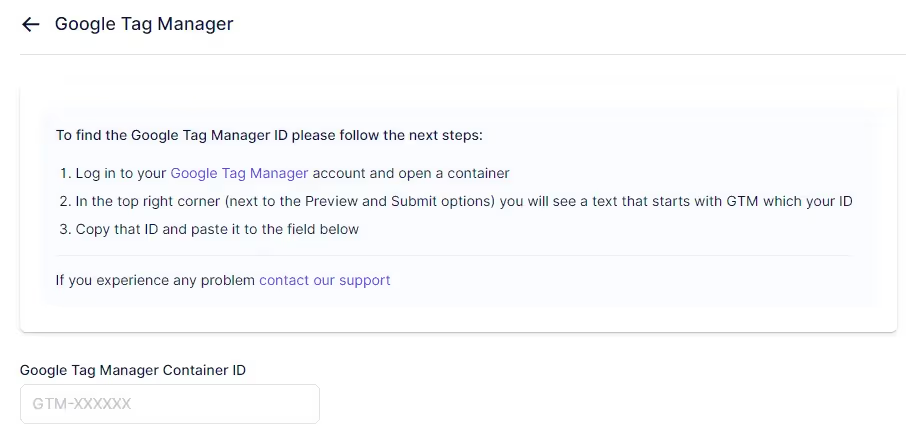
After pasting the ID, click on the “Save Changes” button that appears at the bottom of your screen and your GTM account will be connected with your Quickly Booked App account.
Please note that Quickly Booked App sends the custom event “QuicklyBookedApp_booking_success” to GTM. To test if this event is functioning correctly, navigate to the “GTM Preview” page (within GTM) and test the URL.
Quickly Booked App uses dynamic routes for the booking form. If you set a conversions goal destination URL, for example, ‘/step-4’, and a user arrives at the booking page from service details, the number of steps is reduced by 1, resulting in the success page being ‘/step-3’.
Here are the details of the custom event that you can track in GTM:
Use this information to set up custom event tracking in GTM and monitor successful bookings on your Quickly Booked App Booking Page.
Got questions? We’ve put together clear answers to help you get started with confidence.

All plans include unlimited staff members, services, and locations. There are no per-user or per-location fees and no upgrade required as you grow. Everything is included from day one.

Yes. You can collect deposits, full payments, or partial payments for any service. You decide the amount clients pay upfront, and the rest can be charged later or at the appointment.



