Add and tailor unique features to enhance your booking system and meet specific business needs.
The Ratings & Reviews feature in Quickly Booked Appallows your customers to provide feedback and ratings for their appointments and the employees who provided those services. This valuable tool helps you gather insights into customer satisfaction and improve your services based on real-time feedback.
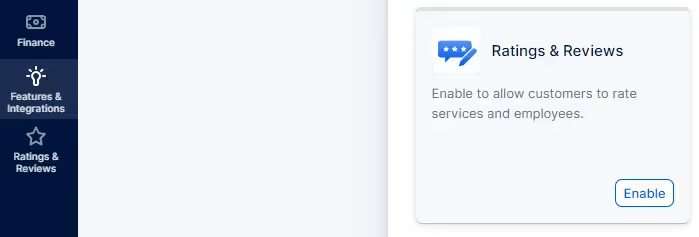
To enable Ratings & Reviews for your account, access the Features & Integrations section, locate (or search for) “Ratings & Reviews” and simply click on the “Enable” button:
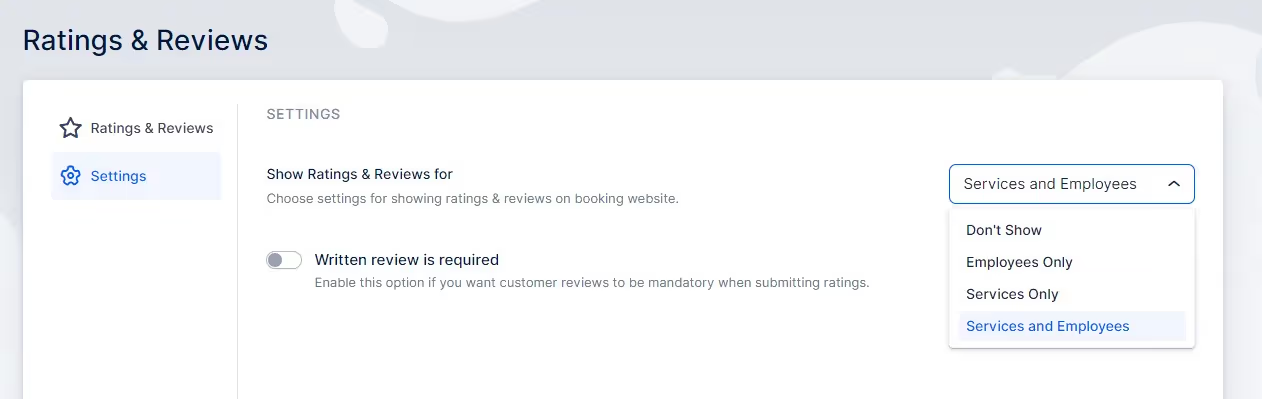
In the Settings tab, you’ll be able to choose whether reviews on your booking website will be shown for both Employees and Services, only Employees, or only Services. You can also choose not to show them on the booking website, so they’re used only for internal purposes.
Also, you can enable the “Written review is required” so your customers can’t provide your appointments/employees with a star rating unless they write a review explaining why they provided such a rating.
For customers to be able to leave a review, you need to send them the link to the review first. Typically, this happens after an appointment but you can add the needed placeholder to any customer-related email notification template.
Access Settings/Email Notifications, and add the {{appointment_rating_review}} placeholder as a hyperlink in your email templates. It can’t be used as a placeholder alone, so you’ll need something like this:
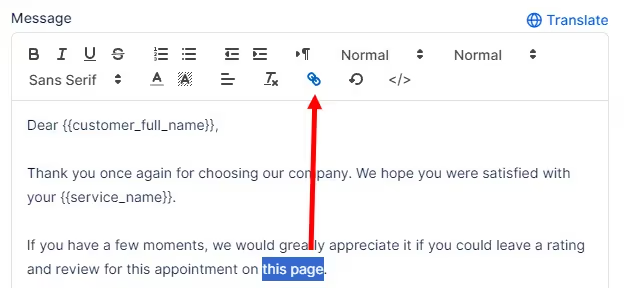
So, select the text that should be hyperlinked and then click on the ‘chain’ icon, as shown in the screenshot above. In the popup that appears, paste the {{appointment_rating_review}} placeholder, like this:

Click on “Save”, and you’ll see it as a hyperlink:

As mentioned before, you can add it to any notification template toward the customer, but since these should be provided after the appointment, we recommend using the “Appointment Follow-up” email template to configure this.
Customers, both guest and registered, can rate their experience on a scale of 1 to 5 stars and provide additional comments if they wish or as required.
Got questions? We’ve put together clear answers to help you get started with confidence.

All plans include unlimited staff members, services, and locations. There are no per-user or per-location fees and no upgrade required as you grow. Everything is included from day one.

Yes. You can collect deposits, full payments, or partial payments for any service. You decide the amount clients pay upfront, and the rest can be charged later or at the appointment.



