Add and tailor unique features to enhance your booking system and meet specific business needs.
Extras are designed to provide you with the option to create additional services or products that complement your primary service. This allows your customers the flexibility to choose whether they want to add something extra to their appointment.
Extras are generated individually for each service. Simply access the Services page, select the service you wish to modify, click on “Edit Service” and you’ll find the Extras tab within it.
To create a new Extra for a service, click on the “Add Extra” button. This will open a new module where you can configure the details of the Extra, such as its name, description, price, and duration. You can also hide the extra on the booking website (so it can only be used in the back end bookings) and (if you define the price) you can choose whether its price will be multiplied with the number of people when group appointments are booked.
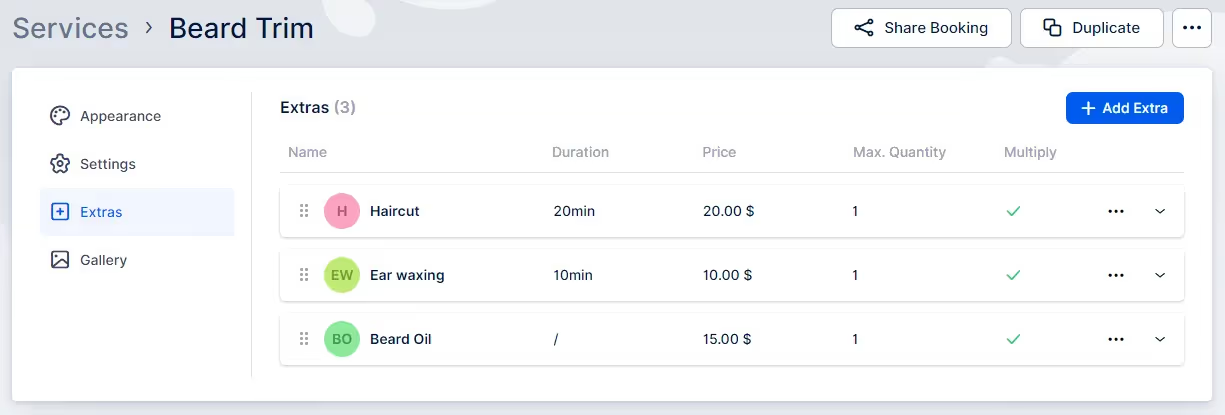
To create an Extra, follow these steps:
Open the tab and click on the “+ Add Extra” button. A popup will appear with the following options:
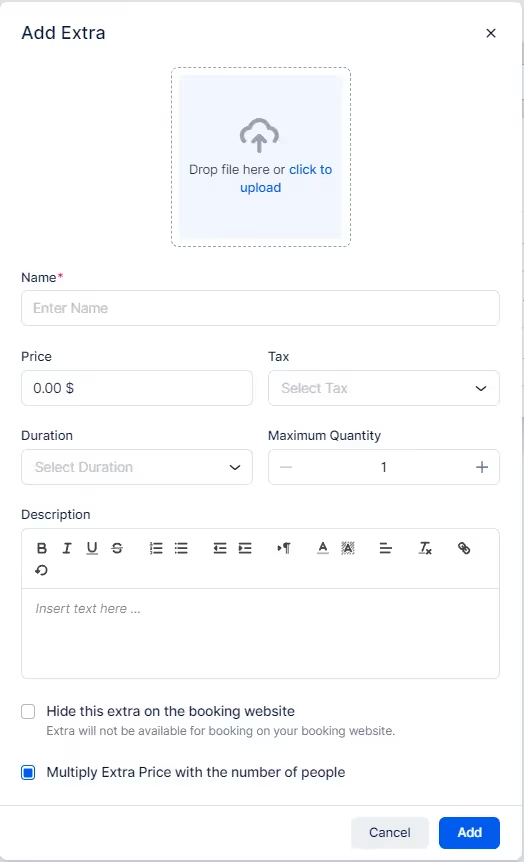
Once you’ve done entering all extra’s details click “Add” and extra will be shown on the page.From the customer’s perspective, they will be able to see Extras both on the Service Details page and within the booking form when selecting a service that includes extra(s).
Got questions? We’ve put together clear answers to help you get started with confidence.

All plans include unlimited staff members, services, and locations. There are no per-user or per-location fees and no upgrade required as you grow. Everything is included from day one.

Yes. You can collect deposits, full payments, or partial payments for any service. You decide the amount clients pay upfront, and the rest can be charged later or at the appointment.



